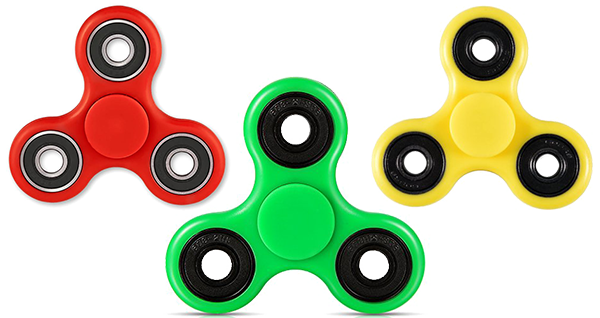
Maybe invented years ago but the product has caught our attention very recently - this year. It's claimed that fidget spinners are helpful to calm people down who are suffering from anxiety and neurological disorders. These devices are also used for the treatment of Autism and ADHD (Attention Deficit Hyperactivity Disorder) even though it's not scientifically recognized.
About the Device
Fidget spinner is a very simple device. It's basically a toy made for little kids. Though invented more than two decades ago, it's been popular in this year - April 2017. The funny thing is that the extreme popularity of this device has led some educational institutions to ban it during the classes.

A good quality fidget spinner may spin up to few minutes! When spinning it may take different forms and that attracts the kids.
Physical Structure
You may find various types of fidget spinners available in market. They are available in different shapes, colors and prices but I will talk about the most common type.
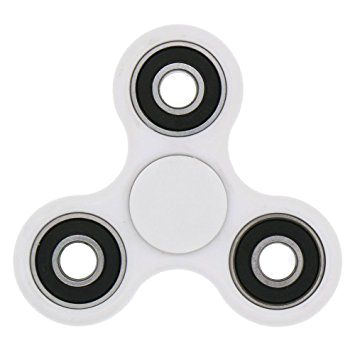
This is the basic shape of fidget spinner. It has 3 lobs. There are 4 bearings in this device. 3 bearings are in 3 lobs and the other one is covered at the center. The price varies depending on the shapes, colors and performance of the device.
Virtual Fidget Spinner
Let's come to our point! You can play fidget spinner virtually from your Smartphone or computer browser.
Simply go to your Google Search and type - Fidget Spinner and see the magic!

This shot is taken from Android Phone. You will get the same from your desktop web browser too.

After loading the page it will be spinning automatically. You've to tap on it to stop spinning. Again if you wanna spin then hit on the Spin button or tap and drag one of the lobs.
Look at the upper right corner. You can also change the lobs to numbers. Simply change the option Fidget to Number.
Hope you enjoyed the topic. See you in the next one . . .
About the Device
Fidget spinner is a very simple device. It's basically a toy made for little kids. Though invented more than two decades ago, it's been popular in this year - April 2017. The funny thing is that the extreme popularity of this device has led some educational institutions to ban it during the classes.
A good quality fidget spinner may spin up to few minutes! When spinning it may take different forms and that attracts the kids.
Physical Structure
You may find various types of fidget spinners available in market. They are available in different shapes, colors and prices but I will talk about the most common type.
This is the basic shape of fidget spinner. It has 3 lobs. There are 4 bearings in this device. 3 bearings are in 3 lobs and the other one is covered at the center. The price varies depending on the shapes, colors and performance of the device.
Virtual Fidget Spinner
Let's come to our point! You can play fidget spinner virtually from your Smartphone or computer browser.
Simply go to your Google Search and type - Fidget Spinner and see the magic!
This shot is taken from Android Phone. You will get the same from your desktop web browser too.
After loading the page it will be spinning automatically. You've to tap on it to stop spinning. Again if you wanna spin then hit on the Spin button or tap and drag one of the lobs.
Look at the upper right corner. You can also change the lobs to numbers. Simply change the option Fidget to Number.
Hope you enjoyed the topic. See you in the next one . . .
Comments
Post a Comment