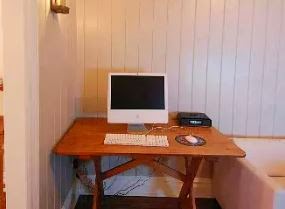
Maintenance Tasks: Extend Your PC Life

Using a desktop computer or laptop in today's world is just like using mobile phone, watch or a vehicle. I mean computer has been a part of our life. We keep many vital information in our PC. Such as books, audios, videos, necessary data etc. 

If the PC crashes everything within it might get lost! And in that time we have to suffer. So, in this post I am gonna suggest you some tips to extend your PC life. 

1. Optimum Environment: A computer especially a desktop must be kept in a moderate environment. It shouldn't be either very cool or very hot. It must be kept in a temperature between 15 to 30 degrees Celsius with a humidity level between 50 to 75 percent. Over heating may cause your hardware loose its capacity soon. 


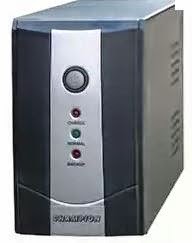
2. Proper Supply of Electricity: A common cause of system damage is the unstable power supply. Surges, spikes and sags in electric supply can damage computer completely or may shorten the lifespan of its parts like motherboard or hard disk. To ensure the physical security of your PC make sure you have optimum supply of power with stability. Use of UPS is highly appreciated to protect computer from electric damage.


3. Proper Electronic Setup: Make sure that you've connected all the parts and components such as motherboard, hard disk, ram, cooling fan in the right place in right manner. Loose connection can lead to serious hard to the computer. So avoid it with care. 


4. Timely Cleaning and Maintenance: The main board of a computer consists nothing but lots of electronic circuits. And that is why a motherboard produces heats. This is very natural. But when dusts accumulated on the motherboard or other components the heats can't be released properly. In that case it leads to system damage. So you should clean your system unit every 3 or 4 months to clean dusts. You can clean dusts with a soft brush. And be careful. Don't do anything that may hurt your system. 


5. Precautionary Measures: The previous 4 points were about hardware related facts. But this one is much more related with software. To maintain your computer performance and increase its life time you need to use antivirus, registry cleaner, disk checker etc. To know about antivirus read this post. And you also need cleanup your disks, recycle bin. And you should look for whether there is any bad sector in your hard drives. 


And finally don't do anything to your PC if your are beginner. Take advice from a person who knows better than you. Don't run your PC continuously. Shut it down at least after every 5 or 6 hours. 


Comments

  1. This comment has been removed by a blog administrator.

    ReplyDelete
  2. It's okay, but you have to make sure that your system remains cool. If you are able to manage heat, then your laptop may work until it's dead :)

    ReplyDelete

Post a Comment

Popular posts from this blog

GTA San Andreas Cheat Code (PDF)

After Vice City, San Andreas is the most popular game released by Grand Theft Auto (GTA). Usually GTA releases role playing game. San Andreas is such a game where you can act like a person. You can do everything. You have to take part in missions and complete them.  To make your missions easier, there are lots of cheat codes. If you can properly apply these codes, the tough parts of the game will be easier. Cheat codes are somewhat like keyboard shortcuts of computer programs.  I've shared 63 cheat codes below. There were more cheat codes in my collection, but I've omitted the less important cheats. Effects or result of the cheats are on the left side, and the codes are on the right side.  You can copy the following codes in your PC. And for your convenience, I've also uploaded a PDF file of these codes. You will find the download link at the bottom.  Effect Cheat Code Adrenaline Mode MUNASEF All Cars Explode ALL...

How to Change IP Address on Windows 10 (Easy Way)

    In fact this is not a very difficult task. But in case of emergency you may not find the right option and this happened in my office few days ago! I solved the problem myself and decided to write a note for you at my site . . .   Changing IP Address on Windows 10 Simply move your mouse pointer at the bottom right corner and make a click on network icon > choose Open Network and Internet settings. Follow the image below -    After clicking on this option you will get the following dialogue box. Here you should notice Ethernet properties. Click on it.   Now you will get another screen as below. Here you will get several options. But our concern is IP settings and Properties . If wanna view your IP details then look at the Properties. If you need to change it then hit on the Edit button.    After clicking on the Edit button you will have two options i.e. Automatic (DHCP) & Manual.    In order the change the IP you should choose ...

Office 2016 Activator (KMSPico 10.1.5)

It's been couple of months after the release of final version of Microsoft Office 2016. And maybe you're tired of finding for a working activator for this version. Today I'm gonna share Office 2016 activator with you - no more waiting!! About the Activator   Name: KMSPico 10.1.5 File Size: 3 MB (Approx) File Type: Zipped Folder 100% Neat & Clean - No virus! Activating Capacity . . . KMSPico 10.1.5 is successfully leading the KMS world for last few months. If everything is okay, success rate is 100%. This tool has been tested and verified by Marks PC Solution. With this tool, you can activate -  Office 2016, 2013 & 2010 Windows 10, 8.1 & 8 Hopefully this version will work for both 32 bit & 64 bit versions of Windows. Installing Office 2016 Collect/ Download Office 2016 Professional Plus from Microsoft or somewhere else. Install it as trial version without any key. Use the follow...